
How to Request a Christmas Facebook Ad 🎄
Christmas is the biggest invitation season of the year, and we want to help you fill your seats. Requesting your Christmas Facebook ad takes just a few minutes. Which steps you follow depends on which version of the Church Fuel Software your church is on.
Not sure which version you have? Click Events in the left bar menu of your Church Fuel Software.
If you see a calendar to select the date of your event, you have Version 2. Follow the Version 2 steps below.
If you see the screen below, you are on Version 1. Follow the Version 1 steps below.
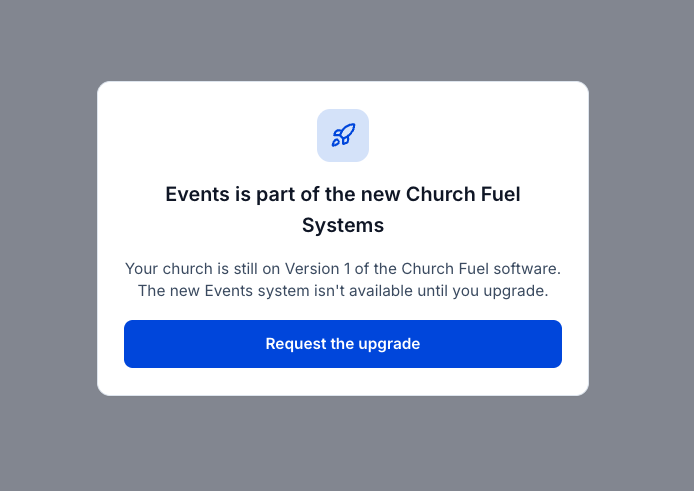
Want to upgrade to Version 2? Scroll down in your left bar menu to New Systems Opt In and start the process!
Version 1: Standard Request Form
1. Open the Christmas ad request form: https://grow.churchfuel.com/christmas-ad-request-2026
2. Fill in your church name, your Christmas service dates and times, and anything special you want people to know.
3. Click Submit.
That's it! Our team takes it from here and will follow up if we need anything else from you.
Version 2: Events System Process
1. Log in to the Church Fuel Software: beta.churchfuel.com
2. Click Events in the left bar menu.
3. Click the date of your event on the calendar.
4. Enter your event details: event name, time, location, and a short description people will see. Then fill out your FAQs, your Offer Stack, and what the call to action will be for someone who wants to attend.
5. Add your service times if you have more than one (for example, a Christmas Eve early service and late service).
6. Upload a graphic for your event, photos, and a promo video if you have it. Your ad will use these assets, so actual photos of your real church family work best.
7. Scroll down to "Add fuel to this event with Meta Ads" and turn it on. You'll see a preview of your Facebook ad on the left and an "Ad Promotion applied" label at the top.
8. Fill in the ad request options (all optional, but they help us a lot):
Target area: Tell us how far from your church you'd like the ad to reach (for example, 15 miles from church).
Preferred launch date: Pick the date you'd like your ad to start.
Assets: Check the boxes if you have video footage or images and graphics for us to use in the ad.
Notes for the Ads Team: Share anything about your audience, who you want to reach, or images you'd like us to use.
9. Save or submit your event.
10. Look for the confirmation that your ad request went through.
Our team will take it from here. 🎉
Need help? Reach out to our support team at success@churchfuel.com and we'll get you sorted out. 🙌