.png)
Phone # Purchase, Brand Approval, Campaign Approval
FOR INTERNAL USE ONLY
Loom Videos:
Purchase Phone number and First section of questions (July 2025)
Code From Pastor and Brand Approval (July 2025)
Campaign Approval (July 2025)
See Also Loom Video of Step 08, 09 and purchasing Phone Number together and Phone Campaign (Oct 2025)
Prerequisites to starting a Phone Application
- Custom Values
- Setup Form
- Log into Church Fuel Software and select the church you are working on in the dropdown menu.
- Go to Settings and then Custom Values
- In Search Values, type in Church. Make sure the following values are filled in: Church Address, Church Name, Church Website and Simple Church URL. You’ll come back to fill in Church Phone with the number you purchase.
-
- Once these are filled in, make sure the Communications Agreement and Subdomain are filed in. You can search each of these in the Search Values
- Communications Agreement - By submitting, you agree to receive church emails and texts. Unsubscribe via the email link or text STOP. Message & data rates may apply.
- Sub domain - visit. (unless it says differently in Active Campaign)

- Sites - Utility Folder
- Once the Custom Values are filled in, click the Go Back button in the left menu and go to Sites. Click Websites on the top menu, and click on the Utility Folder
- Click into each site (404, Brand, Privacy Policy, and SMS Opt-in Page), and click Settings.
- If it’s not already filled in with the Domain, Favicon URL, Head tracking code, Body tracking code, then type in / 11 in the Favicon so it fills in the values for each. Repeat this for all 4 pages.
-
- Once finished, go back to the SMS Opt-in Page and click View Website URL (icon: square with arrow pointing northeast). Make sure the page loads and click on the Privacy Policy below the Submit button. Make sure it loads as well. Leave the SMS Opt-in Page open as you will need the URL when doing the Brand approval later.

Purchasing a Phone Number
- Look up the area code for the church
- From the church’s address (meeting location), and website, do a search for the area code for the church. I google something like Area Code Spokane Valley WA. The AI Overview lists the area code(s) for the area. If there are multiple area codes, this is when I compare them to what the church’s current phone number is and use that area code if possible.
- In the church’s software profile, go to Settings → Phone System → Manage Numbers → +Add Number → Add Phone Number
- Filter for the Area Code and Match to First Part of number, unselect Toll Free number, Apply. Choose a number that is in their town easy to say/remember. Click Proceed to Buy
Brand Approval Process
- In Phone System click on Trust Center → Start Registering Now. (if you just purchased the number, the Start Registering Button on the screen after buying the number will take you to the same place)
- Go through the Business Details (Profile Needs, Business Details, Business Address, Contact Info) and make sure everything is filled in. This will all be information pulled from the Business Profile. Any changes made on these pages will change the Business Profile. Click Continue through each of these as you have confirmed everything is filled.
- On the Business Use Case Page, choose Low Volume Standard (should be selected by default). Select “I acknowledge: Brand and Campaign registration one time $24.49875 will be charged…” and click Continue.
- Texts for Brand/Campaign Approval (Snippets in Text Blaze - Reach out to Charity for access)
- Replace all items in bold below with the appropriate information for the specific church (ie Church Name, Phone Number - the one you just purchased, and subdomain URL for /join. I do also change Pastor Nathan to whoever the pastor is when possible, but this is not required.
- (/ SMS1) This campaign sends event and appointment details—including confirmations and reminders—to members and guests once they have registered for an event or service with CHURCH NAME on the website and opted in to receive SMS notifications.
-
(/ SMS2) Hi John! This is Pastor Nathan from CHURCH NAME. Your Sunday service reservation for this Sunday is confirmed. We’re excited to welcome you! If you need to reschedule or have any questions, please call us at 860-867-5309.
Reply STOP to unsubscribe.
-
(/ SMS3) Hey Brian! This is Nathan from CHURCH NAME. We missed you at Sunday’s service and would love to see you soon! Would you like to join us for another service or event? You can reschedule here: https://visit.revivaltab.org/join
Reply STOP to unsubscribe.
-
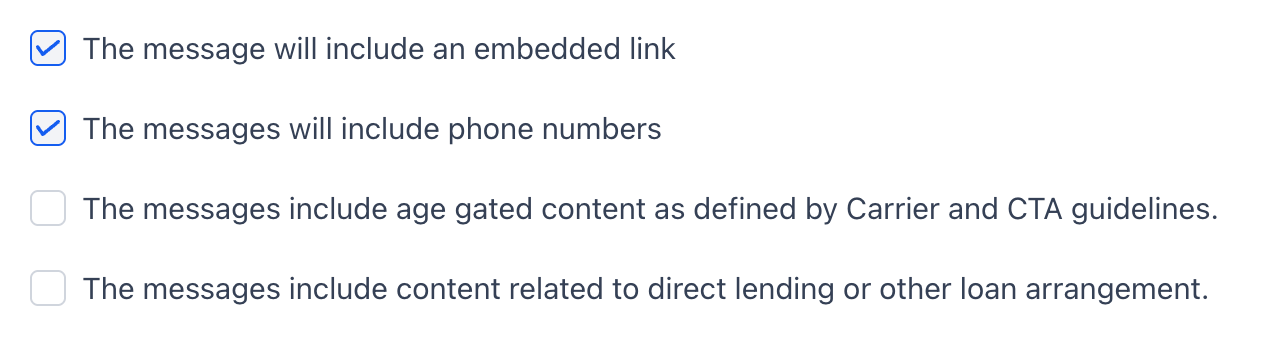
- (/ SMS4) End users opt-in by visiting https://visit.revivaltab.org/join and filling in their details through our “Plan Your Visit” widget or other registration forms. Users check a box to receive notifications and promotional messages, providing their consent. Additionally, end users can also text START to 860-867-5309 to opt in.
- (/ SMS5) Welcome to CHURCH NAME! Thanks for opting in to receive updates and important info. Msg & data rates may apply. Reply STOP to unsubscribe or HELP for more info.
- Once all these are filled in (over two pages), click Submit.
Shaken/Stir, CNAME, Voice Integrity
- While you are waiting for the Brand Approval, and still in the Trust Center, you will finish the rest of the verifications.
- Click on Shaken/STIR (Voice), confirm this says Review in process or Verified
- Click on CNAM (Voice), and Start Registration. In the CNAM Display Name type in as much of the church’s name as you can, without any inappropriate abbreviations. You are limited to 15 characters. Example: Greenacres Baptist Church can be shortened to Greenacres Bapt. Click I certify that the associated Business Profile is in the originator of the phone calls and certify that the display name represents my business. Then click Submit.
- Voice Integrity
- Give the system a few seconds to finish the CNAME, and then move over to the Voice Integrity. Under My Details, select the following information
- Select a use case: Appointment Reminders
- Employee Count: 3
- Average Business Day Call Volume: 5
- Click Submit
- Give the system a few seconds to finish the CNAME, and then move over to the Voice Integrity. Under My Details, select the following information
Campaign Approval
- Once the Brand has submitted and you’ve done the other verifications, the brand application should generally be approved. Go back to A2P Wizard and check (there will also be an email when the brand is approved). If approved, you should see that next to Brand, and see Create Campaign under the Campaign section. Click on Create Campaign.
- Everything should still be the same from the Brand Application, so scroll down and click Continue on the first page.
- On the second page, click the I acknowledge statement and then click Submit
- We should get approval in a few business days. If not, or if the brand failed, use the resources under Resolving Brand/Campaign Rejections for further help.
Resolving Brand/Campaign Rejections
Brand
Brand Rejection with Shaken/Stir, CNAME and Voice Integrity
Ways to search while waiting for EIN docs
Campaign
What to Check (Join/Privacy Policy Pages)
When Join Page isn’t Connected at all
When Join Page shows nonsense in domain url
International Churches
Before you can buy an international number (anything outside of the US and Canada), the are Address and Regulatory Bundles that have to be approved first. Each country’s requirements are different. Most require some kind of Government paperwork showing their registration number, name and address.
Twilio Phone Number Regulations
Go High Level Support Documentation
In Active Campaign:
After purchasing the phone number, please check off the "Setup — Purchase Phone Number" task.
Then once the campaign is approved, you can check off the "Setup — Phone Number Approved" task.
Temporarily while the delay is happening with getting approved, purchasing the phone number is moving them along by marking the phone number field as "Needs Attention"