.png)
Setup Form Incomplete in Active Campaign
02 - Setup Form Sent
______________________________________________
To resend setup form, use this link: https://go.churchfuel.com/start
If customer says they have submitted the onboarding/setup form but they have not moved forward in pipeline:
- At churchfuel.com login to your admin account
- In the black bar at the top, click Forms
- Choose Beta - 02 - Base Info
- Choose Entries
-
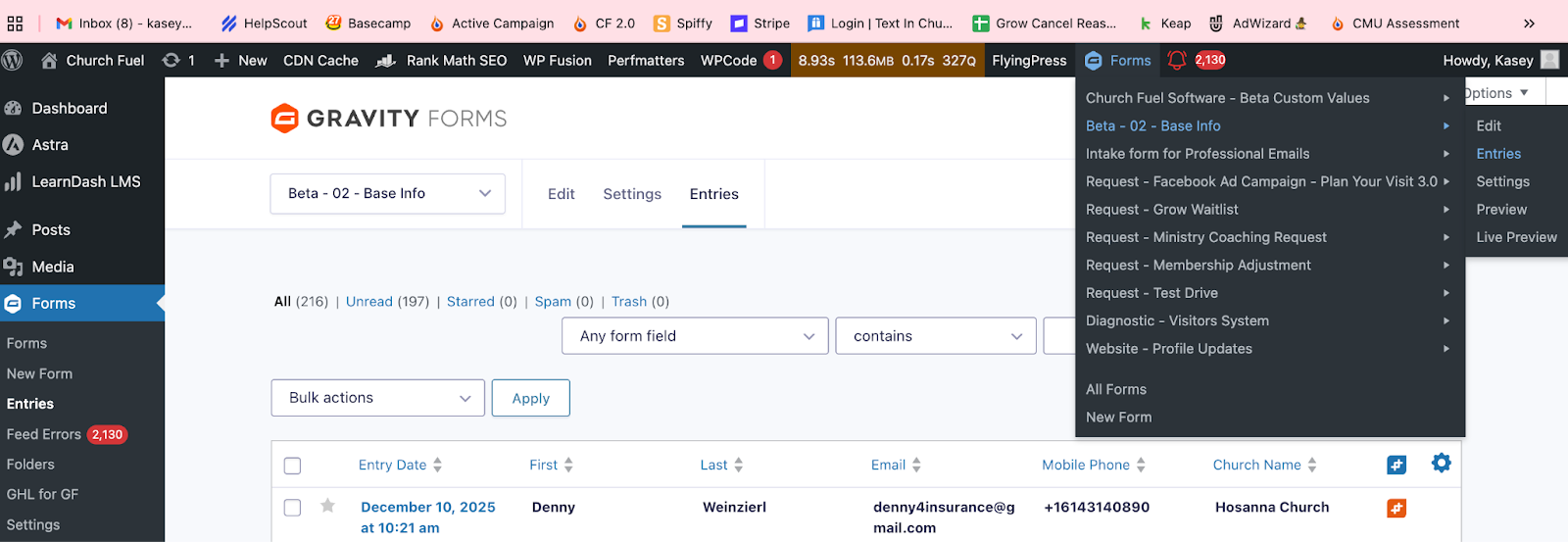
- Search by church name or contact name
If we have their form, you can move them to the next step in the Active Campaign Pipeline
- In Active Campaign, navigate to the Church Account
- Under Software Setup Status → Setup Form - Account Status, change to “Completed”